
PacketSnitch: Analyze · Investigate · Understand
So, what is this thing?
Ask yourself, what would happen if Wireshark, BurpSuite, and Graylog all got together and had a super-mutant-orgy-baby.
It’s that.
Of protocol aware, stream centric, network analysis tools.
Overview
PacketSnitch turns packet captures into searchable, protocol-aware intelligence. It is a desktop packet capture analysis tool that helps security professionals, developers, and researchers rapidly uncover hosts, credentials, certificates, files, locations, protocols, anomalies, and threat-intelligence hits — without writing one-off scapy scripts every time.
The app is built as an Electron network security tool with a Python/TShark backend. That backend is a capable PCAP file analyzer desktop app on its own — parsing, carving, and extracting credentials from PCAPs while adding GeoIP enrichment and threat intelligence from network captures. The frontend turns that output into workspaces for browsing, filtering, converting, and investigating captures, and it can summarize them with optional LLM-powered network analysis via Ollama. Many users keep it open alongside Wireshark as a Wireshark alternative desktop app focused on extracted intelligence rather than line-by-line frames.
Why use PacketSnitch?
PacketSnitch transforms raw network traffic into actionable intelligence, enabling security professionals, developers, and researchers to rapidly uncover hidden patterns, threats, and insights from packet captures. Whether you’re investigating breaches, analyzing protocols, or building network monitoring tools, PacketSnitch provides the comprehensive analysis capabilities you need to turn data into understanding.
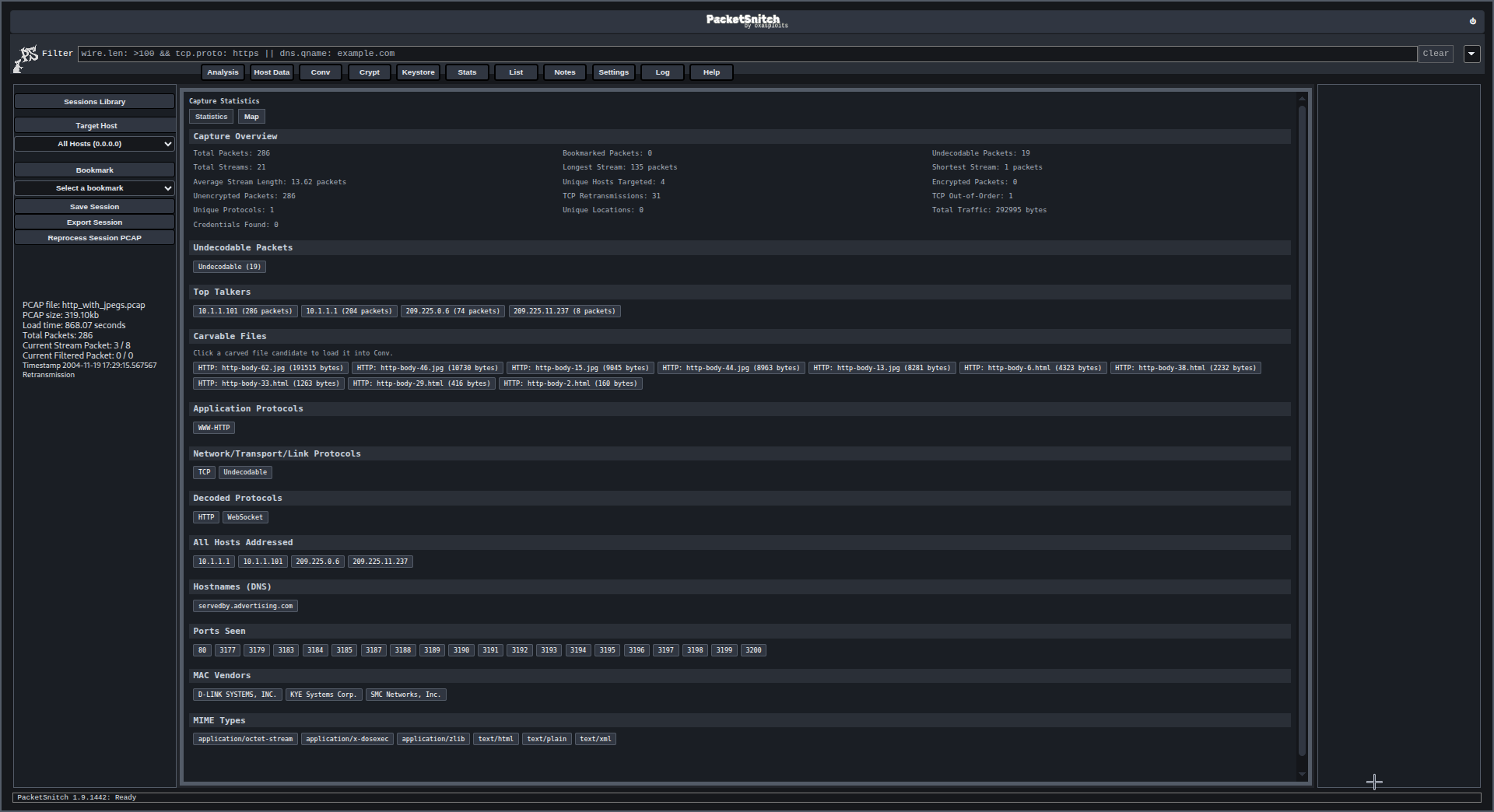
Analyze. Investigate. Understand.
Primary Features Overview
PacketSnitch delivers comprehensive network analysis through five core capabilities that transform raw network data into actionable insights:
Integrated Intelligence & LLM Workflow
PacketSnitch combines advanced protocol decoding with AI-powered analysis. The integrated intelligence aggregation engine works in tandem with LLM (Ollama) to provide contextual summaries, anomaly detection, and automated reporting. Researchers can leverage both traditional analysis tools and AI insights for comprehensive investigation.
Stream Reconstruction to Protocol-Aware Analysis
Transform raw packet streams into fully reconstructed protocol conversations. PacketSnitch performs deep stream reassembly, allowing you to see complete HTTP exchanges, TLS handshakes, DNS queries, and other protocol interactions in their natural context. This protocol-aware analysis reveals relationships and patterns that are invisible in raw packet dumps.
Powerful Search Architecture
Search through terabytes of network data with pinpoint accuracy. PacketSnitch’s search architecture supports a vast array of filter keys including ports, countries, entropy values, MIME types, and custom expressions. The system uses dot-notation filtering and supports complex boolean operations to help you quickly isolate specific network flows, hosts, or conversations.
Advanced Visualization & Heatmap Analysis
From stream dissection to geolocation heatmaps, PacketSnitch provides comprehensive visual analytics. Watch traffic patterns unfold in real-time, explore network topology, and identify geographic distribution of connections. The visualization engine transforms complex network data into intuitive, interactive displays that make analysis and reporting effortless.
Threat Intel Aggregation & Evaluation
PacketSnitch’s threat intelligence module aggregates and evaluates security indicators across your network traffic. It correlates known threat feeds, behavioral patterns, and anomaly detection to provide actionable security insights. The system scores and prioritizes threats based on severity, confidence levels, and potential impact, enabling security teams to focus on the most critical risks first.
Quick Start
Download – grab the latest prod release:
The latest release can be found at the top of the page.
Install – install the package:
Linux:
sudo dnf install ./out/make/*/packetsnitch-*.rpm  # redhat/centos/fedora
sudo apt install ./out/make/*/packetsnitch-*.deb  # debian/kali/ubuntu
Windows:
Click: PacketSnitchInstaller.exe
Launch — launch the desktop app:
packetsnitch                      # Linux
packetsnitch.exe (or click)       # Windows
Full Documentation
- Documentation — Backend, Frontend, Plugins, Filters, Context Menu, and Sample Captures reference.
- Features — full feature list across the backend and every frontend workspace.
- FAQ — frequently asked questions about installation, building, LLM/Ollama, plugins, licensing, and privacy.
Demo
Samples
Looking for a capture to load? See the full Sample Captures list under the documentation guide for protocol-by-protocol pcap/pcapng samples (HTTP, FTP, BGP, DHCP, SIP, SSH, SMB, SMTP, IMAP, LDAP, MQTT, SCTP, PPP, PPPoE, IGMP, LLDP, ATM, BitTorrent, port scans, exploits, USB keystroke injection, WiFi, and mixed captures) plus MD5s and per-capture notes.
License
Please see the EULA for licensing terms and the Refund Policy for purchase information.
Contact Resources
Project Head: Marshall Whittaker support@packetsnitch.com
Questions? See the FAQ or browse the Documentation.
Thanks / Contibutions
- Marshall Whittaker (project design, primary frontend/backend dev)
- X1Vi (PacketSnitch Ad vid/audio)
- Vesteria (backend tor node detection code)
- Venkat Jashwanth Putta (frontend design suggestions, and PS 2.0+ vuln assessments and quality assurance)
- Liz Groski (frontend feedback and some sponsorship stuff)
- Martin Ollivere (Rat on wheel spinning gif)
- tiamo64 (Performance optimizations)
- aestetix (inspiration on how this documentation page should be formatted)
- Anupam Mediratta (path traversal bugfix)
- Gopher (Ideas related to integration into Paddle for payment processor)
- 2600net staff (hosting the irc server where our dev channel resides)
- Everyone else who has tested or contributed in some way, big or small, thank you!